
Is a Leave Management System Worth It? Costs, Key Considerations & ROI Explained
Leaves are good for employees, it prevents excessive burnout and makes them relax which increases job satisfaction. But managing employee leave is a tough task, it takes a lot of time and creates stress for both the HR and employees. Employees don’t always know how many leaves they have left, and HR have to do the same work again and again on excel sheets.
That’s the reason why companies are preferring moving to leave management systems. They are easy to use tools that make the whole process automatic and easy. These systems help you save time, reduce mistakes, and make leave tracking systems simple and easy for everyone.
In this blog we will explain why these systems are necessary, how much they cost, what features you should look for. Let’s understand it in simple words so you can easily decide what’s better for you.
What Is a Leave Management System?
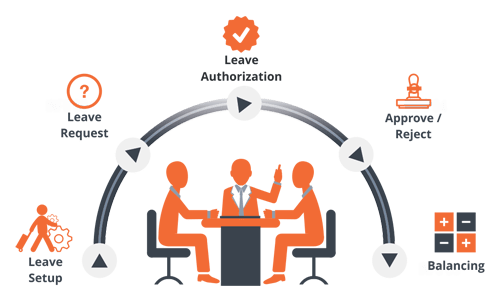
A leave management system is a software that makes it easy for businesses to handle employee leaves. With the help of this tool employees can see how many leaves they have, they can apply for leave, managers can either approve or reject and HR can track all the records. Some systems even help with payroll management to make sure salary is accurate and on time.
Instead of doing everything manually, this tool does it automatically, saves time and free of errors.
Do you want to know more about our hihellohr Software?
Why Manual Leave Tracking Causes Problems
Before talking about cost and benefits, let’s understand why manual way of handling leaves is not working nowadays.
1. Too Many Mistakes:-
Entering data manually can lead to problems like missed records, wrong leave counts, or approving the same leave twice.
2. No Clarity:-
Employees don’t even know how many leaves they have left or if their leave request is approved or not.
3. Too Much Work for HR:-
HR teams can save the time they have to spend every month on manual work of leaves and sending reminders. That time could be spent on other important things.
4. Legal Risks:-
Incorrect leave records can cause legal issues, especially in places with strict labor laws about paid time off, medical leave, and so on.
The Real Cost of Doing It Manually
Now, think about how much time your HR team spends each month just on leave management:
- Receiving leave requests
- Approving or rejecting them
- Updating spreadsheets or records
- Informing employees about leave balances
- Matching leave data with payroll
If HR spends just 8 hours a month on leave calculations, and their time costs ₹500/hour, that’s:
- 500 × 8 hours = ₹4,000 per month
- 4,000 × 12 months = ₹48,000 per year
Therefore, manual labor costs money even if you aren’t paying for software.


What Will a Leave Management System Cost You?
There are a few standard methods for billing leave management software:
1. Per Employee, Per Month
This is the most popular method. You just have to pay a fixed monthly fee for each employee, mainly between ₹30 to ₹100.
Example:
₹5,000 per month for 100 workers at ₹50 a month
2. Flat Monthly Fee
Some tools charge a fixed monthly amount regardless of how many employees you have. These are best for small teams.
3. Part of an HR Software Package
If you currently use HR software, leave management may be an extra add-on or a feature of the system itself.
What’s Typically Included?
Most modern systems offer:
- Online portals for employees
- Dashboards for managers
- Custom leave types and policies
- Built-in holiday calendars
- Automatic leave balance tracking
- Payroll integration

What to Look for in a Good Leave System
Don’t choose the cheapest system while making the decision. Look for features that solve your day-to-day problems.
-
1.Custom Leave Policies
Every business is different. Your system should let you create leave types like sick leave, earned leave, casual leave, etc., and adjust carry-forward rules and leave cycles.
-
2.Live Leave Balances
Employees and managers should be able to check leave balances instantly without asking HR.
-
3. Mobile Access
A good system should work well on phones and tablets so employees can apply for leave anytime, anywhere.
-
4.Shared Calendar View
Managers should know about the absence of the employee so that they can plan workload better.
-
5. Payroll Sync
Once leave is approved, it should automatically update the payroll system to avoid mistakes in salary calculations.
-
6. Reports and Insights
Look for tools that show useful reports—like leave trends, departments with high absenteeism, and leave summaries.
Things to Check Before Buying
Choosing software should be a smart decision. Think about these points before you make a purchase:
1. Is It Simple to Use?
The tool should be simple enough for everyone to use without help or training.
2. How Fast Can You Use It?
Some systems are ready in a day; others may take weeks to fully set up. Ask about the onboarding time.
3. Support & Help
Will the company help you set it up? Do they offer support if something goes wrong later?
4. Can It Grow With You?
Select a tool which fits your size both now and in the future. When your workforce grows from 20 to 200, you don’t have to change again.
5. Is Your Data Safe?
Make sure the system protects your employee data with strong security features.


Understanding the ROI
Let’s look at a quick return-on-investment example:
Situation:
- 100 employees
- Manual leave tracking takes 10 hours/month
- ₹500/hour cost = ₹5,000/month
Leave System Cost:
- ₹50/employee/month = ₹5,000 per month
At first the cost seems the same. But here’s why it’s a good investment:
- HR can use the time on other tasks
- Payroll become more accurate
- Better record keeping, reduce legal risks.
- Employees get clear updates.
Bonus ROI:
If your managers and HR together save just 2 working days each month, you’re already saving tens of thousands of rupees yearly—plus, your entire leave process runs smoother.
A Real-World Success Story
A tech company with 200 employees was managing leaves through Excel and emails. HR spent over 20 hours per month updating records.
After switching to a cloud-based system:
- Time spent on leave management dropped to just 2 hours/month
- Managers could view team calendars easily
- Payroll mistakes dropped by 90%
- Employee satisfaction with HR improved

Frequently Asked Questions (FAQs)
Q. Is a leave management system good for Startups?
– Yes, small businesses benefit the most. As most of them don’t have a full HR team, a leave management system helps save time, avoid mistakes, and stay legally compliant right from the start.
Q. How much does a leave management system cost?
– Most systems charge a small monthly fee per employee between ₹30 to ₹100, depending on the features. Some tools also offer a fixed monthly price for small teams.
Q. What kinds of leaves can the system track?
– The system can track all types of leave like paid leave, sick leave, casual leave, earned leave, maternity or paternity leave, and more based on your company’s leave policy.
Conclusion
If you want to know if the leave management system is worth the cost, then the answer is yes, if you want to save time, reduce mistakes and keep the employees happy. Consider it as a long term plan that gives your HR team time to focus on other tasks and not on the paperwork. In the end, investing in an Employee Leave Management System is not just for automation. As your company grows things get hard to handle. A leave management system helps you handle things smoothly, without any extra stress. It’s not just a smart tool but a long term solution.